

Why Manual Strategy Testing Fails in Modern Forex Markets
Manual backtesting—scrolling back through historical price charts and visually verifying trade setups—has long been a rite of passage for retail Forex traders. However, in modern financial markets driven by algorithmic liquidity providers and high-frequency execution, manual testing is fraught with systemic flaws. Human traders inherently suffer from confirmation bias, sub-consciously ignoring candle wicks that would have triggered stop-losses while over-emphasizing winning trades that fit their narrative.
Furthermore, manual backtesting completely ignores dynamic market realities such as variable spreads, slippage, latency, and swap rates. A strategy that appears profitable on static charts often fails when execution costs are accounted for. By transitioning to automated backtesting with verified MT5 Expert Advisors, traders can process tens of thousands of trades across decades of multi-currency data in seconds, delivering objective, statistically sound performance data.
Key Takeaway: Visual manual backtesting misses execution costs like spread widening and overnight swaps. Automated testing in MetaTrader 5 removes emotional bias and provides real-world historical statistics.
Step-by-Step Guide to Setting Up MT5 Strategy Tester for EAs
MetaTrader 5 features one of the most advanced multi-threaded Strategy Testers in retail trading. Configuring it correctly is vital to ensure your backtest results closely mirror live market conditions.
- Open the Strategy Tester: Press Ctrl + R in MT5 to open the Strategy Tester panel, then select the "Single" test mode for an individual Expert Advisor run.
- Select Expert Advisor & Symbol: Choose your target EA program and select the currency pair or instrument you wish to test.
- Choose Modeling Quality: For maximum precision, set the modeling quality to "Every tick based on real ticks". This utilizes actual broker tick data (bid and ask) rather than generated artificial tick curves.
- Configure Execution & Deposit Settings: Input your starting balance, leverage, and set realistic execution latency (e.g., 20–50 ms ping) to simulate network delays.
- Adjust Input Parameters: Navigate to the "Inputs" tab to configure your strategy's risk rules, lot sizes, indicator parameters, and stop-loss/take-profit boundaries.
Pro Tip: Always use "Every tick based on real ticks" mode when backtesting intra-day EAs or scalping strategies to account for real bid-ask spread fluctuations.
Key Performance Metrics to Evaluate Before Going Live (Drawdown vs. Win Rate)
Evaluating an Expert Advisor requires looking far beyond absolute profit numbers. A strategy that doubles a balance in two months but suffers an 80% equity drawdown is a ticking time bomb for real money accounts.
- Maximal Equity Drawdown: The largest peak-to-trough decline in your account balance during the test period. Aim for drawdown figures under 20% for conservative risk profiles.
- Profit Factor: The ratio of total gross profits to total gross losses. A robust automated system typically maintains a Profit Factor between 1.40 and 2.00+.
- Win Rate vs. Risk-Reward Ratio (RRR): A high win rate (e.g., 85%) is meaningless if losses are 10 times larger than gains. Focus on the mathematical expectation (Expected Payoff per trade).
- Recovery Factor: Measures how efficiently the strategy recovers from drawdown phases (Total Net Profit divided by Maximal Equity Drawdown). A value above 3.0 indicates high resilience.
Turning YouTube Trading Strategies into Automated MT5 Code
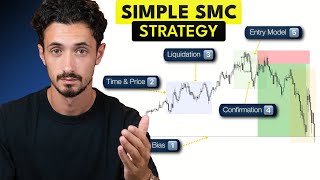
Social media and video platforms are filled with trading strategies claiming absurd win rates. When tested manually on cherry-picked historical setups, these strategies seem foolproof. However, converting these concept rules into automated MQL5 code and running them through the MT5 Strategy Tester almost always paints a very different picture.
To test online strategies systematically, combine custom technical indicators with clear rules for entry, exit, and risk management. If you prefer to evaluate existing traders who execute these methodologies manually, you can also explore automated trade distribution using modern copy trading platforms.
Warning: Video tutorials frequently omit spread costs, missed entries, and bad fills. Coding the precise logic into an EA is the only objective way to verify if a strategy has a true statistical edge.
Custom MQL Development: When to Build Your Own Expert Advisor
While off-the-shelf automated software offers great utility, unique trading methodologies often require proprietary programming. Off-the-shelf options may lack complex trade management functions—such as partial closes, news filtering, custom trailing stops, or multi-timeframe confirmation.
If your strategy relies on non-standard technical rules or highly specific risk protocols, commissioning dedicated code is the logical next step. You can easily request custom build options from professional developers via professional MQL development services to turn your trade setup concepts into clean, efficient MT5 code ready for rigorous backtesting.
Frequently Asked Questions About MT5 Backtesting and EAs
Review answers to common questions regarding MetaTrader 5 Strategy Tester settings, tick data precision, and performance verification before deploying EAs to real trading accounts.